Home / Cases / PC Control
24/7 Production IoT & Systems Architecture Windows 10 Enterprise LTSC (1 PC) ESP8266 Bare-Metal C++

PC Control: Out-of-Band Control & Workstation Unlock Without USB Dongles

An intentionally ambitious personal workstation project: from ESP8266 power control to remote Windows unlock across the Session 0 boundary.

Sporting Curiosity Over Shipping Delays: Unlock Without USB HID
The ESP8266 controls power and the physical button, while a system agent runs before user sign-in. Telegram → relay powers on the PC → Windows boots → the Session 0 agent uses PsExec to start a separate process in the interactive session → the process enters the configured password on the secure Winlogon desktop → WTS confirms the unlock.

The workstation can reach its desktop without a USB HID dongle or hardware KVM. Windows authentication remains in place: the configured password is used.
Unlock Time
1.4 – 1.8 s
Full authorization cycle including lockscreen dismissal
Hardware USB Dongles
0 pcs
Zero keyboard emulators or consumed USB ports
Shutdown Verification Window
20 s
Protection against phantom network packet storms
Automated tests
412 tests
Power, status, MQTT and workspace · local run: 60% of selected Python module statements; firmware and password-input script excluded
Metrics Retention Window
30 days
Window activity & network slices in SQLite WAL

End-to-End Topology & Communication Protocols

The system agent, desktop agent and microcontroller have separate responsibilities. The ESP8266 controls power without direct access to the Windows filesystem. Access to the password depends on configuration and process permissions.

topology_map.txt — PC Control System Overview TLS 1.3 / QoS 1
┌────────────────────────────────────────────────────────────────────────────────────────┐
│                             TELEGRAM CLIENT INTERFACE                                  │
│     • Mobile client    / Desktop   • Custom Emoji UI   • Interactive buttons           │
└───────────────────────────────────────────┬────────────────────────────────────────────┘
                                            │ HTTPS (Bot API)
                                            ▼
┌────────────────────────────────────────────────────────────────────────────────────────┐
│                         CLOUD VDS COORDINATOR    (Ubuntu Linux)                        │
│  Hosting: api.w1bbex.ru • systemd: pc-control-bot.service (User: pccontrol, Sandboxed) │
│                                                                                        │
│  ┌────────────────────────┐  ┌────────────────────────┐  ┌──────────────────────────┐  │
│  │     power_flow.py      │  │    health_engine.py    │  │       history.py         │  │
│  │  FSM state machine     │  │  Retain packet filter  │  │  SQLite WAL Storage      │  │
│  │  Atomic JSON state     │  │  20s network quiet     │  │  Server Matplotlib       │  │
│  └───────────┬────────────┘  └───────────┬────────────┘  └──────────────────────────┘  │
│              └─────────────────────┬─────┘                                             │
│                                    ▼                                                   │
│                      Mosquitto MQTT broker (Port 8883, TLS 1.2/1.3)                    │
└────────────────────────────────────┬───────────────────────────────────────────────────┘
                                     │
             ┌───────────────────────┴────────────────────────┐
             │ MQTT TLS (Wi-Fi)                               │ MQTT TLS (Tailscale / WAN)
             ▼                                                ▼
┌─────────────────────────────────────────┐   ┌──────────────────────────────────────────┐
│      HARDWARE LAYER     (ESP8266)       │   │        LOCAL PC HOST     (WINDOWS)       │
│                                         │   │                                          │
│  • Microcontroller: ESP8266 (160 MHz)   │   │ ┌──────────────────────────────────────┐ │
│  • Relay GPIO5 (D1) to PWR_SW pins      │   │ │ SESSION 0: boot_agent.py (SYSTEM)    │ │
│  • Case button:  GPIO14 (D5, IRAM ISR)  │   │ │ • OS startup (Task Scheduler)        │ │
│  • Morse lock FSM (EEPROM)              │   │ │ • WTS API (screen status         )   │ │
│  • BearSSL TLS 1.2 (PROGMEM X.509)      │   │ │ • LibreHardwareMonitor sensor bridge │ │
│  • Audio easter egg:      playRelayBeat │   │ │ • Run PsExec64   -s -x -i            │ │
└────────────────────┬────────────────────┘   │ └──────────────────┬───────────────────┘ │
                     │ Physical               │                    │ PsExec64 -s -x -i   │
                     │ ATX pulse              │                    ▼                     │
                     ▼                        │ ┌──────────────────────────────────────┐ │
┌─────────────────────────────────────────┐   │ │ WINLOGON DESKTOP: type_password.py   │ │
│    MOTHERBOARD PWR_SW CONTACTS          │   │ │ • SetThreadDesktop(hDeskWinlogon)    │ │
│  • Short press: 500 ms (power on)       │   │ │ • Dismiss lock screen                │ │
│  • Hold: 5000 ms (emergency reset)      │   │ │ • Key scan codes   (VkKeyScanW)      │ │
└─────────────────────────────────────────┘   │ └──────────────────┬───────────────────┘ │
                                              │                    │ Sign-in OK          │
                                              │                    ▼                     │
                                              │ ┌──────────────────────────────────────┐ │
                                              │ │ SESSION 1+: agent.py (User Desktop)  │ │
                                              │ │ • Start on interactive login         │ │
                                              │ │ • Window poll (3s, SQLite WAL)       │ │
                                              │ │ • GDI icon extraction -> TG Emoji    │ │
                                              │ │ • Binary JPEG screenshot protocol    │ │
                                              │ │ • WinRT GSMTC + PyCaw (CoreAudio)    │ │
                                              │ └──────────────────────────────────────┘ │
                                              └──────────────────────────────────────────┘
PC Control Telegram dashboard showing session status, sensors and actions Command /menu in Telegram

Central Control Surface: Telegram Dashboard & Core Functions

Instead of bloated web panels, the single operational interface is a Telegram bot. Issuing /menu renders an atomic telemetry report and an adaptive control keypad:

  • Windows Session Monitoring: Authoritative status verified through WTS API (uptime 2 h 37 min 51 sec), adaptive Windows OS emoji, active foreground window title (Telegram — PC Control), and current playing track with playback progress.
  • LibreHardwareMonitor Sensor Slice: Accurate CPU load and temperature (37% • 42°C), GPU telemetry with active power wattage (35% • 39°C • 16.3 W), RAM usage (47.6% • 8.1 GB / 17.1 GB), and primary drive [C:] status (91.9 GB free).
  • Quick Action Matrix: 1-click power controls, instant multi-monitor screenshot capture compressed in JPEG (quality 72, 1600x1000 thumbnail fitted under 950 KB MQTT limit), app launcher, volume remote, and power-off.

Architecture & Subsystems

In-depth breakdown of bare-metal hardware, Windows kernel isolation, cloud FSM orchestration, and user-space multimedia agent.

ESP8266 Microcontroller at 160 MHz Turbo

Firmware written in modern C++ and hardened against intermittent Wi-Fi drops and tight RAM constraints (free heap < 10 KB). All critical button handlers execute directly in microcontroller RAM.

  • Non-blocking ISR Queue: Physical button interrupts bound to IRAM_ATTR, streaming events into a 16-element ring buffer with 35ms software debounce.
  • Morse Code Engine: Precise differentiation between taps (< 500ms) and holds (≥ 500ms), guarded by silence windows (5s before input, 3s after).
  • EEPROM Anti-Bruteforce Lock: 3 consecutive failed attempts lock the hardware button and commit an XOR checksum to flash. Recoverable exclusively via MQTT.
pc_remote_mqtt.ino
// Button interrupt ring buffer in IRAM    
void IRAM_ATTR physicalButtonISR() {
  unsigned long now = millis();
  int pinState = digitalRead(PHYSICAL_BUTTON_PIN);
  uint8_t nextHead = (isrQueueHead + 1) % ISR_QUEUE_SIZE;
  if (nextHead != isrQueueTail) {
    isrTimeQueue[isrQueueHead] = now;
    isrStateQueue[isrQueueHead] = pinState;
    isrQueueHead = nextHead;
  }
}
Interactive Hardware Morse Lock Simulator (GPIO14)

Test the hardware algorithm: hold down the button for the required duration. Short tap (< 500ms) registers as «S» (•), sustained hold (≥ 500ms) as «L» (—). Pauses exceeding 5 seconds reset sequence (ATTEMPT_QUIET_MS silence guard).

EEPROM Anti-bruteforce:
Target Lock Sequence: S — L — S — S — L
1 S • <500ms
2 L — ≥500ms
3 S • <500ms
4 S • <500ms
5 L — ≥500ms
500 ms
Short tap (<500ms) Long hold (≥500ms)
GPIO14 Controller Status
Awaiting pulse input... Tap or hold the button to register symbol.
hardware_wiring_blueprint.txt — Physical NodeMCU & F_PANEL Wiring Bare-Metal Wiring
┌────────────────────────────────────────────────────────────────────────────────────────┐
│ PHYSICAL PINOUT & HARDWARE WIRING BLUEPRINT │
│ NodeMCU ESP8266 v3 • Gigabyte B450M S2H │
└────────────────────────────────────────────────────────────────────────────────────────┘
[ ATX Power Supply ]
│
├────── Purple wire (+5VSB Standby 5V) ─────────────┐
└────── Black wire (Common GND) ────────────────────┤
▼
[ PC Chassis Front Button ] ┌───────────────┐
│ │ NodeMCU │
└───── 2-pin chassis button cable ─────────►│ D5 ESP8266 │
(IRAM ISR, Morse FSM, EEPROM Lock) │ │
│ 160 MHz Turbo │
│ │
┌────────────────── 3-pin (VCC / GND / D1 Signal) ─────┤ D1 D2 │
│ └───┬─────────┬─┘
▼ │ │
┌──────────────────────┐ │ │
│ 1-Ch Opto Relay │ │ │
│ 3.3V Songle Module │ │ │
└──────────┬───────────┘ │ │
│ Dry contacts COM + NO │ │
▼ │ │
┌─────────────────────────────────────────────────────────┐ │ │
│ Motherboard: Gigabyte B450M S2H │ │ │
│ │ │ │
│ [ F_PANEL ] ◄── PWR_SW shorting (500ms boot / 5s) ────┘ │ │
│ │
│ [ 12V RGB ] ─── ✕ VOID (12V will burn 5V ARGB!) │
│ │
│ [ CPU_FAN ] ─── 4-pin PWM (fan speed modulation) ─────────►────┐ │
└─────────────────────────────────────────────────────────┘ │ │
│ │ 3-pin ARGB (DIN)
│ │ (16x WS2812B)
▼ ▼
┌───────────────────────────────────┐
│ CPU Cooler: Ocypus Gamma A40 WH │
│ • Motor: 4-pin PWM from Board │
│ • LED: 5V ARGB from ESP (D2) │
└───────────────────────────────────┘

Low-Level Win32 Hooks & Session Isolation

The system agent runs under the NT AUTHORITY\SYSTEM account inside isolated Session 0. Lacking a graphical desktop, it possesses elevated privileges to interact with the Service Control Manager and desktop handles.

  • WTS API Multi-Signal Consensus: Polling WTSGetActiveConsoleSessionId, WTSSessionInfoEx flags, and OpenInputDesktop handles.
  • PsExec64 launch: the agent uses -s -x -i to start a separate input process on the interactive session’s secure desktop.
  • Fail-Safe Abort Guard: If the target desktop name fails to switch to Winlogon within 5 seconds, the script terminates immediately without injecting keystrokes (exit code 2).
type_password.py
# Bind thread to active input desktop       
hDesk = user32.OpenInputDesktop(0, False, DESKTOP_SWITCHDESKTOP)
user32.SetThreadDesktop(hDesk)

# Check the Winlogon security barrier
if get_desktop_name() != "Winlogon":
    sys.exit(2)  # Abort without entering the password

# Translate scan codes and emulate input
for char in password:
    vk = user32.VkKeyScanW(ord(char))
    user32.keybd_event(vk & 0xFF, 0, 0, 0)

Finite State Machine & Phantom Packet Filtering

The Linux cloud coordinator acts as the single source of truth. It dispatches commands strictly upon validated FSM transitions and protects against broker reconnection anomalies.

  • Status freshness: health_engine.py rejects older status updates by timestamp, accounting for state and boot ID transitions.
  • 20-Second Shutdown Grace Window: SHUTDOWN state is finalized only after a continuous 20-second absence of heartbeats from both Windows agents.
  • Checked deployment: deploy_vds.py verifies SHA-256 and imports, restarts the service and rolls back if the health check fails or a traceback is detected.
health_engine.py
# Reject stale phantom packets                      
if packet_ts < component.last_valid_ts:
    logger.warning("Dropped outdated MQTT packet")
    return

# Verify host shutdown        
if silent_duration >= 20.0 and agents_offline:
    self.state = PCState.SHUTDOWN_OBSERVED

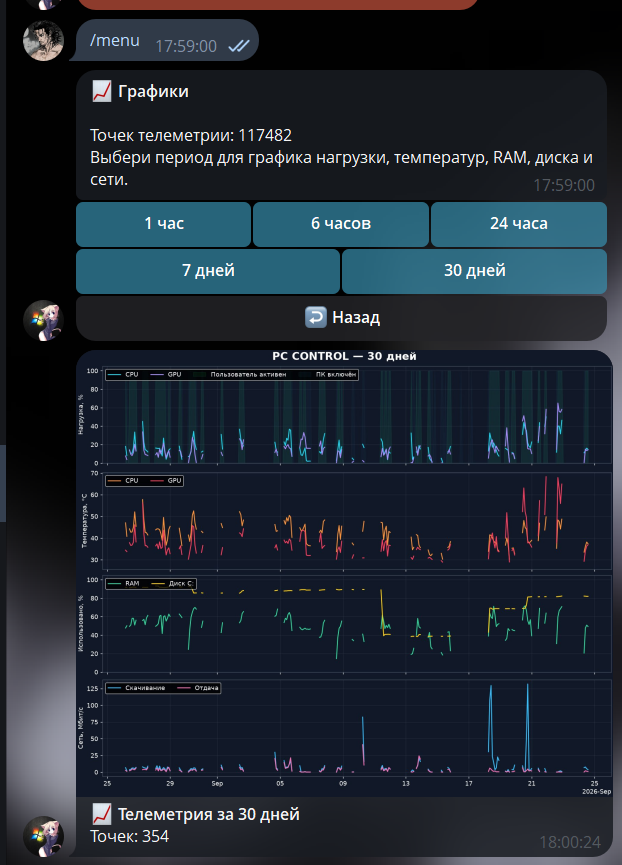
Server-side analytics and telemetry charts (Matplotlib + SQLite WAL)

Telemetry snapshots from Windows agents are continuously aggregated into SQLite WAL on the VDS. To avoid streaming heavy raw data to mobile clients, the bot renders 4-tier dark-mode analytics graphs on the fly via Matplotlib.

Points in Database: 117 482
Selectable Periods: 1h • 6h • 24h • 7d • 30d
Network Bandwidth: up to 125 Mbps
30-day CPU, GPU, temperature, memory and network telemetry chart Generated on VDS • 30 days of history

Interactive User Session, WinRT GSMTC & GDI Icons

The user-space agent in Session 1+ manages multimedia integrations and Telegram UI interactions. Heavy calls are deduplicated and cached for 0% CPU consumption.

  • Local GSMTC Time Anchor: Calculating playback position via _anchor + (time - anchor_time) eliminates continuous COM queries to Explorer.
  • GDI Executable Icon Extractor: Extracting 256x256 icons via PrivateExtractIconsW, fixing alpha channels, and publishing to Telegram Custom Emoji.
  • Binary Screenshot Protocol: 4-byte BE uint32 length header + JSON metadata + raw JPEG buffer validated by 0xFF 0xD8 magic bytes.
media_manager.py
# Local subsecond track timing (0% CPU)               
def get_current_position(self):
    if not self.is_playing:
        return self._anchor_pos
    elapsed = time.time() - self._anchor_time
    return min(self.duration, self._anchor_pos + elapsed)
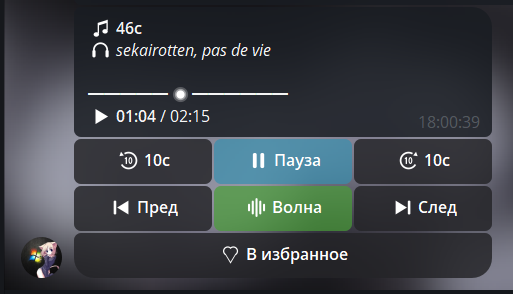
Telegram music remote with timeline and playback controls WinRT GSMTC • Player remote

Full music remote in the bot

While remote PC tools commonly omit audio controls, PC Control features a dedicated media remote directly inside Telegram. Through Windows Runtime GSMTC, it controls any system player (Yandex Music, Spotify, VK, web browsers).

  • Live Interactive Scrubber: Real-time progress bar (01:04 / 02:15), artist and track title (sekairotten, pas de vie).
  • Full Playback Controls: Pause/play, seek ±10 seconds, track skip, and instant 'Add to Favorites' like button.
  • 'My Wave' Radio Stream: Dedicated 1-tap trigger for Yandex Music's infinite algorithmic smart radio stream.
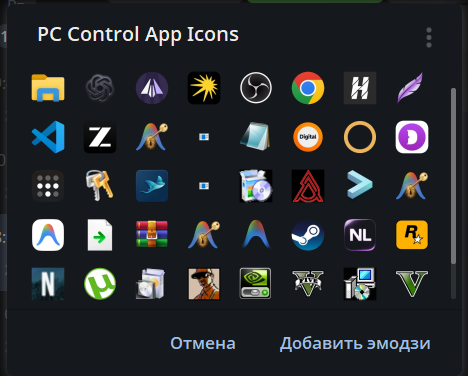
Custom Windows application icon emoji pack GDI Win32 • Custom Emoji Pack

Custom emoji generator for the launcher

Modules app_emoji_manager.py and icon_extractor.py bridge Windows host apps with Telegram. The agent automatically scans installed application shortcuts and binaries.

  • GDI PrivateExtractIconsW: Pulling native 256x256 high-resolution icons without compression artifacts.
  • Custom Emoji Sync: Packaging and publishing the 'PC Control App Icons' set via the Telegram Bot API.
  • Visual 1-Tap Launching: Application buttons (Steam, Zed, VS Code, GTA V, Torrent, OBS, Chrome) render with genuine desktop icons.

Incident Analysis & Edge Cases

Non-obvious edge cases resolved at the junction of the Windows kernel, Paho MQTT network stack, and embedded microcontroller hardware.

Paho MQTT Crash on Windows Sleep Transition (WinError 10054 / 1236)
Critical Failure
The paho-mqtt library establishes a local socketpair for inter-thread wakeups on Windows. During network drops or NIC low-power transitions, Windows forcefully closed the socketpair, throwing an unhandled exception that crashed the agent process.
Resolution: Implemented a low-level monkey-patch for Client._loop and _packet_queue. WinError 10054/1236 socketpair faults are safely intercepted, triggering a graceful network loop reset.
Stale status updates after MQTT reconnection
Network Anomaly
Retained or delayed messages after reconnection can give an inaccurate picture of component status.
Protection: health_engine.py compares status timestamps and accounts for boot changes; this does not describe command replay protection.
Protection Against Accidental Windows Account Lockout
Lockout Mitigation
During remote password entry, an unexpected keyboard layout switch or missing character-to-scancode mapping could corrupt input and deplete Windows login attempts.
Protection: the script attempts to activate the English layout, disables Caps Lock and checks characters with VkKeyScanW as they are entered. An unsupported character aborts before Enter is sent.